FilaForms
Conditional logic in Laravel forms: when fields should show (and hide)
Conditional logic in Laravel forms: when fields should show (and hide)
A job application form asks "Do you have a work permit?" If yes, move on. If no, show a field asking which visa type they'd apply for. Simple concept, surprisingly annoying to implement well.
Conditional logic is what separates a dumb form from a smart one. Fields that appear based on previous answers make forms shorter and less intimidating — especially in multi-step forms where entire steps can be hidden. But wiring them up in Laravel requires more thought than most tutorials let on.
The basics: Filament's reactive forms
Filament has built-in support for conditional fields using the ->live() modifier and ->visible() / ->hidden() callbacks.
Here's a straightforward example:
Select::make('employment_status')
    ->options([
        'employed' => 'Employed',
        'self_employed' => 'Self-employed',
        'unemployed' => 'Unemployed',
        'student' => 'Student',
    ])
    ->live()
    ->required(),

TextInput::make('company_name')
    ->visible(fn (Get $get) => in_array($get('employment_status'), ['employed', 'self_employed']))
    ->required(fn (Get $get) => in_array($get('employment_status'), ['employed', 'self_employed'])),

TextInput::make('university')
    ->visible(fn (Get $get) => $get('employment_status') === 'student')
    ->required(fn (Get $get) => $get('employment_status') === 'student'),
The ->live() modifier tells Filament to send the field value to the server on every change. The ->visible() callback runs on the server and determines whether to render the field.
This works. But there are a few things to know.
Server round-trips
Every time someone changes a ->live() field, Livewire sends a request to the server. On a fast connection with a nearby server, the delay is barely noticeable. On a slow mobile connection, there's a visible flicker as conditional fields appear or disappear.
You can control the debounce:
Select::make('employment_status')
    ->live(debounce: 500) // wait 500ms after the last change
Or use ->live(onBlur: true) to only trigger when the user leaves the field. This reduces requests but means conditional fields don't appear until the user tabs away.
For public-facing forms where users might be on mobile, onBlur: true is usually the better default. For admin panel forms where you control the network environment, immediate reactivity is fine.
Common conditional patterns
Show/hide based on a selection
The most common pattern. A dropdown or radio button controls which fields appear.
Radio::make('contact_preference')
    ->options([
        'email' => 'Email',
        'phone' => 'Phone',
        'mail' => 'Physical mail',
    ])
    ->live()
    ->required(),

TextInput::make('phone_number')
    ->tel()
    ->visible(fn (Get $get) => $get('contact_preference') === 'phone')
    ->required(fn (Get $get) => $get('contact_preference') === 'phone'),

Textarea::make('mailing_address')
    ->visible(fn (Get $get) => $get('contact_preference') === 'mail')
    ->required(fn (Get $get) => $get('contact_preference') === 'mail'),
Note: the email field doesn't need a conditional because you're probably already collecting it.
Show additional fields based on a checkbox
Toggle::make('has_dietary_requirements')
    ->label('Do you have dietary requirements?')
    ->live(),

Textarea::make('dietary_details')
    ->label('Please describe your dietary requirements')
    ->visible(fn (Get $get) => $get('has_dietary_requirements'))
    ->required(fn (Get $get) => $get('has_dietary_requirements')),
Cascading selects
Field B's options depend on field A's value. Country → State is the classic example.
Select::make('country')
    ->options([
        'us' => 'United States',
        'ca' => 'Canada',
        'uk' => 'United Kingdom',
    ])
    ->live()
    ->afterStateUpdated(fn (Set $set) => $set('state', null))
    ->required(),

Select::make('state')
    ->options(function (Get $get) {
        return match ($get('country')) {
            'us' => ['ca' => 'California', 'ny' => 'New York', 'tx' => 'Texas'],
            'ca' => ['on' => 'Ontario', 'bc' => 'British Columbia', 'qc' => 'Quebec'],
            'uk' => ['eng' => 'England', 'sco' => 'Scotland', 'wal' => 'Wales'],
            default => [],
        };
    })
    ->visible(fn (Get $get) => filled($get('country')))
    ->required(),
The afterStateUpdated callback resets the state field when the country changes, so you don't end up with "California, Canada."
Conditional validation
Sometimes you want the field to always be visible but validation rules change based on context:
TextInput::make('budget')
    ->numeric()
    ->required()
    ->minValue(fn (Get $get) => $get('project_type') === 'enterprise' ? 10000 : 0),
The validation trap
Here's a mistake that catches people: making a field conditionally visible but always required.
// Bug: field is hidden but still required
TextInput::make('company_name')
    ->visible(fn (Get $get) => $get('is_employed'))
    ->required(), // This validates even when hidden!
The fix is to make the requirement conditional too:
TextInput::make('company_name')
    ->visible(fn (Get $get) => $get('is_employed'))
    ->required(fn (Get $get) => $get('is_employed')),
If you forget this, users who don't see the field will get validation errors they can't fix. They'll submit the form, get "company name is required," and have no idea where that field is because it's hidden for their selection.
Conditional logic without code
All of the above requires PHP. You're writing closures, referencing field names as strings, and hoping the Get calls return what you expect.
For developers, this is fine. But if you want a non-developer to be able to set up "show field X when field Y equals Z," code isn't the answer — one of the reasons every Laravel app eventually needs a form builder.
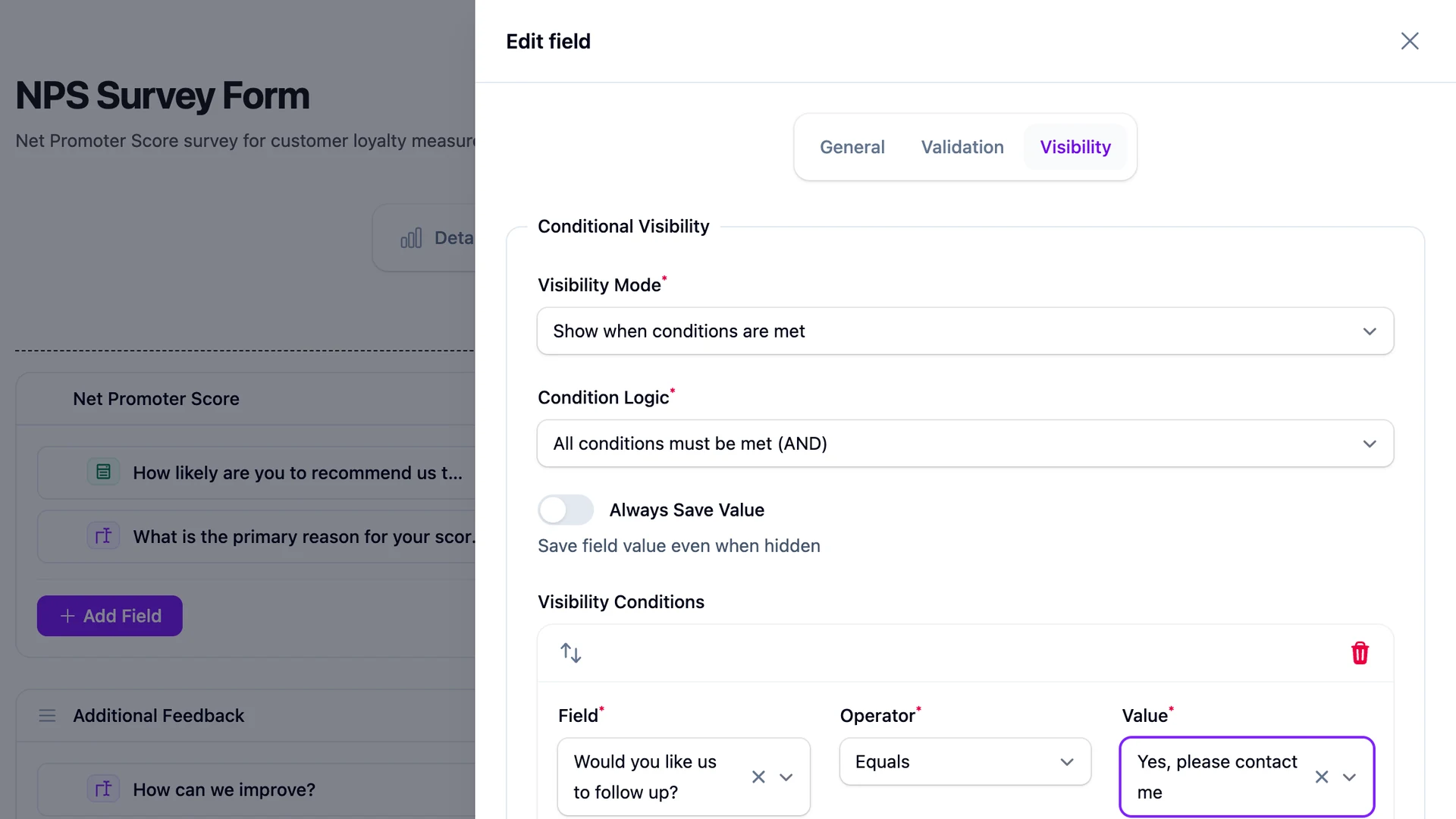
FilaForms lets you configure conditional logic in the visual form builder. When adding a field, you set visibility rules through the UI: "Show this field when [Employment Status] is [Employed]." No closures, no PHP, no deployment.
This matters for forms that change often. A survey that gets updated quarterly, a registration form that varies by event — if the person making changes isn't a developer, visual conditional logic removes a bottleneck.
Testing conditional forms
Conditional forms have more states than they look. A form with three conditional branches doesn't have one happy path — it has at least four (three branches plus the case where no condition triggers).
For each conditional field, test:
- The field appears when the condition is met
- The field disappears when the condition is not met
- Validation runs only when the field is visible
- Changing the trigger field back and forth doesn't leave stale data
- The submission contains the right data for each path
Laravel Dusk or Livewire's testing utilities handle this. But write the tests. Conditional forms are where "it works on my machine" goes to die.
Keep it simple
The temptation with conditional logic is to build tangled decision trees. Field A controls field B, which controls field C, which controls fields D and E. Three levels deep, and nobody, including you in six months, can follow the logic.
If your conditional logic needs a flowchart to explain, the form is probably too complex. Split it into separate forms, or rethink what you're asking.
The best conditional forms have one level of depth: a trigger field and a handful of dependent fields. That's it. Your users get a form that feels straightforward, and you get code you can still understand in six months.