FilaForms
Event Registration Forms in Laravel: From RSVP to Stripe Checkout
Event Registration Forms in Laravel: From RSVP to Stripe Checkout
Eventbrite charges 3.7% plus $1.79 per paid registration on its Professional tier. For a $20 workshop with 100 seats, that's $253 going to a third party before you've paid your venue. For a free meetup, you don't pay the fee, but the page is wrapped in Eventbrite's branding and the attendee data lives on Eventbrite's servers, not yours.
I've watched this exact bill land in a Stripe dashboard. Three workshops, same organizer, the third one was the moment we wired up a self-hosted event registration form in Laravel and stopped routing through anyone else. The math gets ugly fast once you cross fifty paid seats. It's not the Eventbrite fee on a single event that hurts — it's the running total over a year of workshops, and the loss of the email list that should have been yours.
This post is the form layer of that switch. A four-field RSVP, a Stripe Checkout handoff for paid events, a capacity limit that closes the form when the seats are gone, and the confirmation email that makes the registration feel real. None of it is exotic. Most of it is what you don't ship.
The smallest viable RSVP form
The smallest viable RSVP form has four fields. Anything beyond this on the first pass is a tax on completion, not a useful question. You can ask more after the seat is held — on the confirmation page, in the post-event survey, in the calendar invite description. The form itself should be the thinnest possible door between "interested" and "registered".
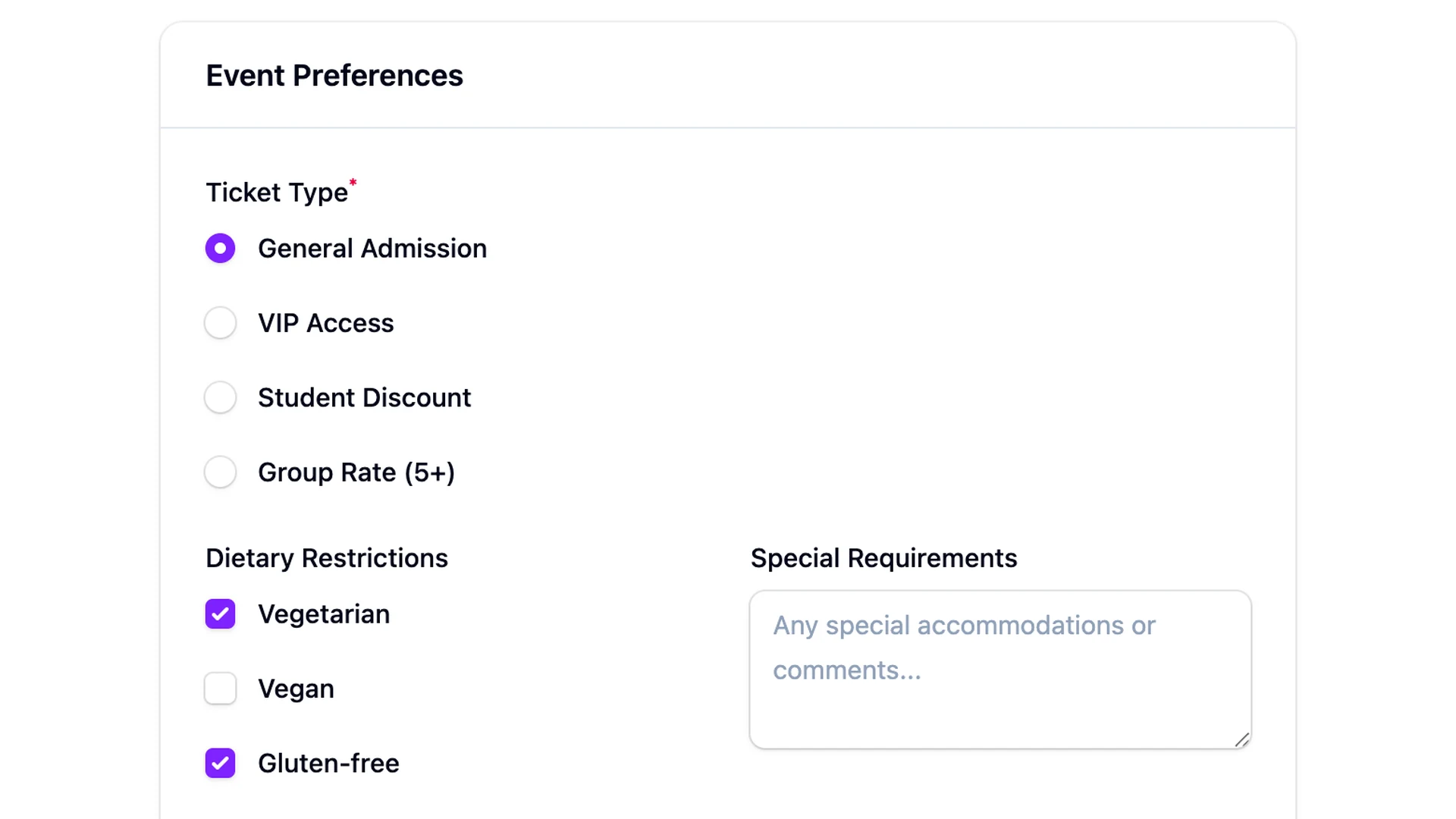
- Name. First name only. You're greeting them at the door, not running a background check.
- Email. This is the seat receipt, the calendar invite, the day-of reminder. One field, validated, required.
- Number of guests. A small integer field, default 1, capped at whatever your venue can handle. Most events allow plus-ones; pretending they don't makes attendees lie.
- Dietary restrictions. Only if food is involved. Optional, single line, open text. A dropdown of "vegan / vegetarian / gluten-free / other" misses every allergy you didn't list.
That's the floor. No phone number, no company, no "how did you hear about us". Those questions live in the follow-up email, where the attendee has already committed and is in a different mood about answering.
Free events don't need a payment step
Free events don't need a payment step. RSVP form, submit, confirmation email, done. Adding Stripe to a free signup is friction with no upside — you're asking the attendee to pull out a credit card to confirm a thing that costs nothing, and the abandonment rate is exactly what you'd expect.
Paid events are where Stripe enters. The pattern I keep landing on is: form fields collect the RSVP data, the submit action creates a Stripe Checkout session for the price times the guest count, and the submission is marked unpaid until Stripe's webhook fires checkout.session.completed. The seat isn't held until the payment lands. This protects you from the "I'll register and pay later" abandoner who never pays and blocks a real attendee.
The Stripe wiring itself — Connect account, webhooks, the integrations package — is its own topic. A dedicated walkthrough is coming, covering the webhook events you subscribe to and the application-fee split. This post is about the form layer; that one will be about the payment layer. Together they're the full path from "click register" to "money in your account, seat in your database".
Capacity is a listener, not a field
Capacity is a listener, not a field. A registration form needs to close itself when the seats are gone — otherwise you oversell, refund, apologize, and lose the trust of the next person who books.
FilaForms doesn't ship a built-in capacity field. I've thought about it. I haven't built it. What you have instead is the FormSubmitted event, and a listener on that event is enough. The shape is: count the submissions, compare to the capacity stored on the form, flip the form's active flag to false when the count hits the limit.
class CloseFormAtCapacity
{
    public function handle(FormSubmitted $event): void
    {
        $capacity = $event->form->meta['capacity'] ?? null;

        if ($capacity === null) {
            return;
        }

        $registered = $event->form->submissions()->sum('guests');

        if ($registered >= $capacity) {
            $event->form->update(['active' => false]);
        }
    }
}
Register that listener in EventServiceProvider, store the capacity on the form record (a JSON meta column or a dedicated field), and you're done. Once the form goes inactive, visitors hit a closed page instead of a working form, which is the right behavior for a sold-out workshop. If you'd rather not turn people away, the next step is the at-capacity overflow into a waitlist — same listener, different branch.
The confirmation email is the moment registration feels real
The confirmation email is the moment registration feels real. Until it lands in the inbox, the attendee isn't sure the form worked. That email needs to do three things: confirm the seat, attach a calendar invite, and tell them what to bring.
FilaForms ships auto-response notifications — the NOTIFICATIONS_EMAIL_AUTO_RESPONSE feature is enabled per form and fires on every successful submission. You write the email body once, reference the submission fields as merge tags, and it goes out the moment the form is submitted. For the calendar invite, generate an .ics file and attach it; most mail clients will offer "Add to calendar" automatically.
Everything beyond the confirmation — the day-before reminder, the post-event survey, the no-show follow-up — belongs in your queue, fired off the same FormSubmitted event or hung off where confirmations flow into your own systems. The auto-response is the first beat; the rest is your sequence.
Show-up rate is the metric most organizers skip
Show-up rate is the metric most organizers skip. They count registrations and feel good. The number that matters is registrations who showed up, and for paid events, the gap is small. For free events, the gap is enormous — somewhere between 40% and 70% no-show is the range I've seen, and you won't know which end you're on without measuring.
Three numbers worth tracking for an event signup form in Laravel:
Registrations versus check-ins. The simplest version: a check-in step on event day (a list, a QR code, a "mark attended" button in Filament) and you've got the ratio. Free events drift toward 50%; charging $10 instead of nothing flips the number.
Form drop-off. FilaForms' completion-rate analytics covers this — the ratio of form starts to form completes. For a four-field RSVP, you should be over 70%. If you're under 50%, you've got too many fields, or the price is on the form before the value is.
Time-to-fill. The average seconds between first focus and submit. Long times mean the form is confusing or the fields are heavy. RSVPs should clear in under thirty seconds; if yours are sitting at two minutes, look at the dietary field — it's usually the one with the open-text question that nobody knows how to answer.
That's the registration form
Four fields for the RSVP, Stripe Checkout for the paid version, a FormSubmitted listener that closes the form at capacity, an auto-response that doubles as the calendar invite, and a check-in step you run on event day. Nothing exotic. Most of the wiring is plumbing the form already gives you.
If you haven't set up FilaForms yet, you can grab FilaForms here. A dedicated post on the Stripe Connect side of this flow is in the queue. Coming up next: the at-capacity overflow into a waitlist, for the workshops that sell out faster than you expected.
Eventbrite's published pricing is the source for the fee math at the top of this post.