FilaForms
Internal IT Request Forms: Replacing the Ticket Spreadsheet
Internal IT Request Forms: Replacing the Ticket Spreadsheet
An employee emails IT — "need a monitor." The IT lead reads it on their phone at lunch, logs it in a Google Sheet that night, and forgets which row. Three weeks later the employee asks "where's that ticket." The spreadsheet doesn't know. It has a row, somewhere, with the right columns mostly filled in, and a status column that says "open" because nobody changed it. An internal request form in Laravel — five fields and a status column — fixes most of this, and that's what the rest of this post is.
This is the reality of internal IT at a 50–200 person company. The IT team is two to five people. They run on a shared Google Sheet plus email plus Slack DMs. The alternative is Zendesk or Jira Service Management or Freshservice, all priced per seat in the $20–$30/agent/month range depending on tier, all built around a workflow engine the team won't configure. For a five-person team that's a four-figure annual line item for a ticket queue, and most of the workflow features go unused.
I've shipped this internal request form twice at companies in that 50–200 band, and both times the spreadsheet was the unspoken bottleneck nobody had time to fix. The pattern that worked is small: a five-field form, a string-backed enum on the submission record, one notification into the IT channel, one email back to the requester when status changes. No workflow engine. No SLA tracker. A queue that knows where every ticket lives.
The 5-field IT request form
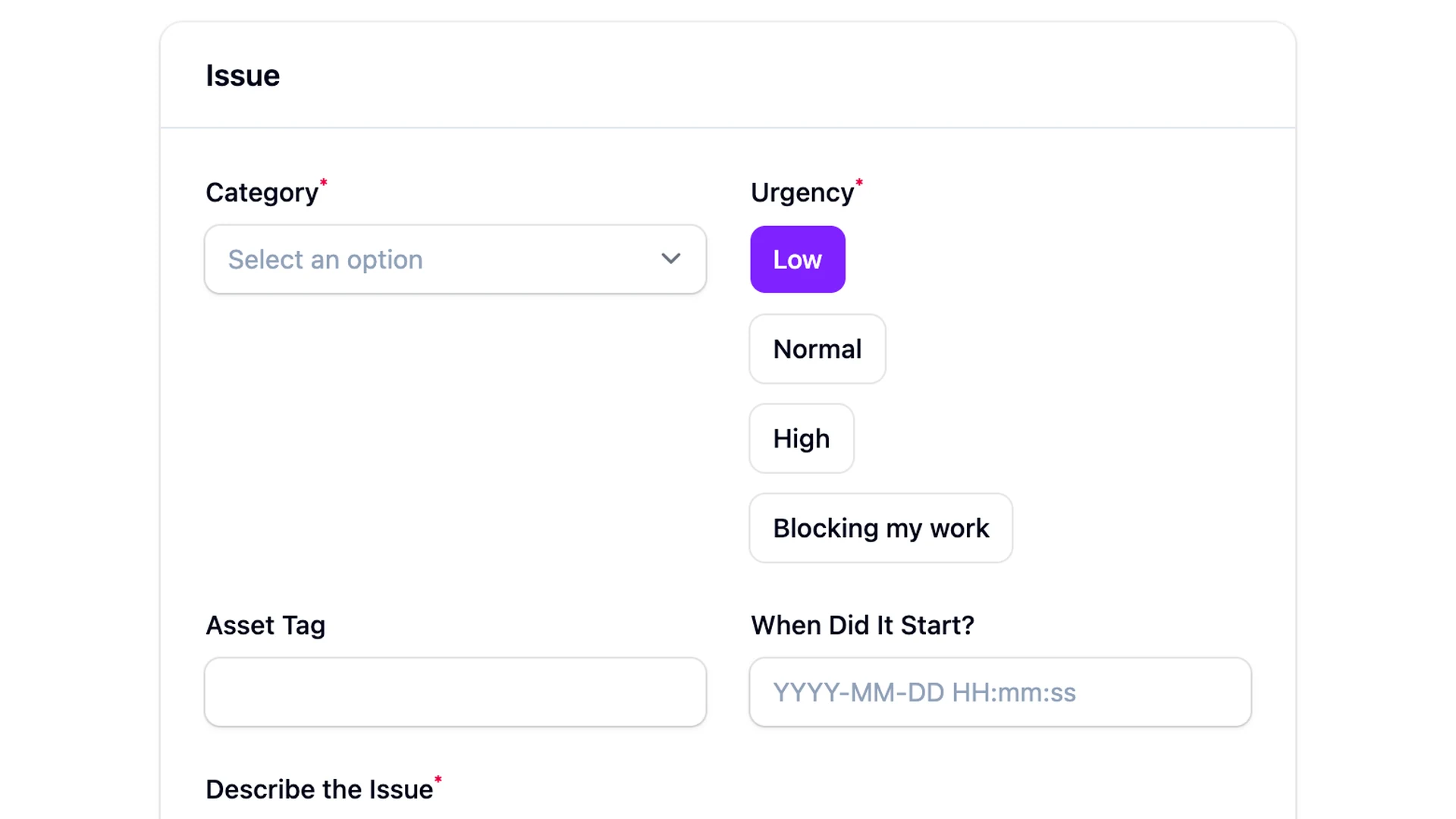
The 5-field IT request form is what a small IT team needs and nothing more. Five fields covers the triage need: who's asking, what kind of request, how urgent, what they want, and what system it touches. Anything beyond this is a tax on a coworker who's trying to get back to their job, and the longer the form, the more they'll skip it and DM the IT lead.
- Requester. Auto-populated from
auth()->user(). No "type your name" field — the form lives behind the company SSO, and the user is already known. - Request type. A short select —
hardware,access,software,other. Four options, no more. The categories drive routing and the metrics in section 6. - Urgency. Three levels —
low,medium,high. Defaulted to medium. The next section is about why the default matters. - Description. Textarea, required, no character cap. This is the one field that has to be open text.
- Affected system. Optional select or text — laptop, monitor, VPN, Slack, internal tool name. Useful for routing, not always known.
Five fields, three of them one-click. A request takes 20 seconds to file from a phone.
Why "urgency: high" should default to medium
Without a default on the urgency field, everyone picks high. I built this form once with no default — three radio buttons, no preselection — and watched everything come in as High for a week straight. The requester defaults to the loudest option, because their request feels urgent to them, and the form is asking them to rate it. The signal collapses on day one.
A defaulted medium fixes most of it. The requester has to take a deliberate action to bump it up — uncheck Medium, click High — and that small effort is enough that they only do it when they mean it. The distribution evens out: most things are Medium, the genuine fires are High, the "do this when you have time" stuff is Low. Three buckets that mean something.
The hover text on each option matters more than the label. "High" on its own is whatever the requester wants it to be. "High — system is down or blocking my work right now" is a contract. Spell it out.
Status workflow without a workflow engine
A small IT team doesn't need a state machine library. The status workflow for an internal request is four values: Submitted, Acknowledged, In Progress, Resolved. That's it. A string-backed PHP enum on the submission record covers the whole feature. An Eloquent cast handles the column, and a Filament select on the submission resource handles the transition.
The wiring is a sibling it_ticket_statuses table keyed on form_submission_id, or a column added to your application's own migration. The enum lives in your application code, not in the FilaForms package — FilaForms doesn't ship a built-in status workflow. It ships submissions; you ship the status column on top.
The same enum-on-the-submission pattern carries the hiring queue — interviews move through screening, phone, onsite, offer in the same way. Most teams don't need workflow software. They need a column with a known set of values and a UI that updates it.
What you skip by not buying Jira Service Management: automated escalation rules, SLA timers with breach notifications, custom workflow states per request type, an approval engine. For a five-person team handling 30 tickets a week, none of that earns its keep.
Where the notifications go
A submitted ticket that nobody sees is a ticket that dies in the queue. Two notification paths cover the two audiences. The IT team needs the request in their channel; the requester needs to know when something changes.
The IT team gets it in Microsoft Teams — the channel they already live in. A listener on the FormSubmitted event reads the submission payload and posts a card to a Teams incoming webhook. Type, urgency, requester, a link back to the submission in Filament. The walkthrough at post status updates to a Teams channel covers the card formatting and the webhook config end-to-end.
The requester gets an email on every status change. A second listener — this one on the status-column update, not on the original submission — fires a transactional email: "Your request was acknowledged," "Your request is in progress," "Your request is resolved, here's what we did." Three lines each, no template gymnastics.
If your IT team isn't on Teams, FilaForms' outgoing webhooks deliver the same payload to any HTTPS endpoint with retries — Slack, Discord, a self-hosted Mattermost, or a Zapier step that fans out to whatever channel the team uses.
What to measure
The metric IT departments live by is time-to-first-acknowledgment. Not time-to-resolution — that one depends on whether the request needs a new laptop ordered or a checkbox flipped. Time-to-first-acknowledgment is the gap between submitted and acknowledged, and it's the number that tells a requester whether IT saw their ticket or whether it fell into the spreadsheet again.
Three numbers tell the rest of the story. Time-to-acknowledgment, median and p90. Time-to-resolution by request type, because hardware lags behind access and software. Request volume by category, week over week, because a spike in access requests two months after a reorg tells you something the calendar doesn't.
FilaForms' submissions analytics view covers volume by date and form, which is most of the visibility a small IT team needs. The time-to-acknowledgment number comes from the two timestamps on the status table — created_at on the submission, acknowledged_at on the status row — and a one-line query against them.
What we got wrong
The first version of this form had five urgency levels. Critical, High, Medium, Low, and a fifth I'd cringe to admit I shipped: "Needs to be done today, can't wait." The thinking was that more granularity would give the IT lead better triage signal. It didn't. The distribution flattened — everything was Critical or "today" — because the labels were emotional, not contractual, and people picked the one that matched their feeling about the problem.
The fix was a downgrade. Three levels with hover-text definitions. Low: "Convenient to fix, not blocking." Medium: "Inconvenient, but I have a workaround." High: "Blocking my work right now." The distribution evened out within a week. Same form, same team — the only thing that changed was the contract behind each option.
The smaller pattern wins
A spreadsheet is a queue with no notifications, no field contract, and no memory. A workflow engine is a queue with too much of all three. The middle is a form, a status column, and a Teams ping. That's what runs the IT desk at most 50–200 person companies.
If you haven't set up FilaForms yet, grab FilaForms here. When you're ready to wire the IT channel, the Teams notification walkthrough is the next read.